 ParentPhrase
The parenting scripts app that gives you the exact words to say
Most parenting apps tell you what to do. ParentPhrase tells you what to say — step-by-step scripts for meltdowns, bedtime battles, and food refusal, with what to avoid and why each approach works.
- Works completely offline
- No account required
- No analytics, no tracking
- Data stays on your device
You know what you want. The words are the hard part.
Mid-meltdown, advice evaporates
Your toddler is on the floor of aisle seven. Dinner is untouched again. Bedtime has become a nightly negotiation. You've read the books and follow the experts — but in the heat of the moment, "stay calm and validate feelings" doesn't tell you what to actually open your mouth and say.
And most of what comes out under stress — threats, bribes, raised voices — is exactly what the research says makes things worse.
Have the right words ready
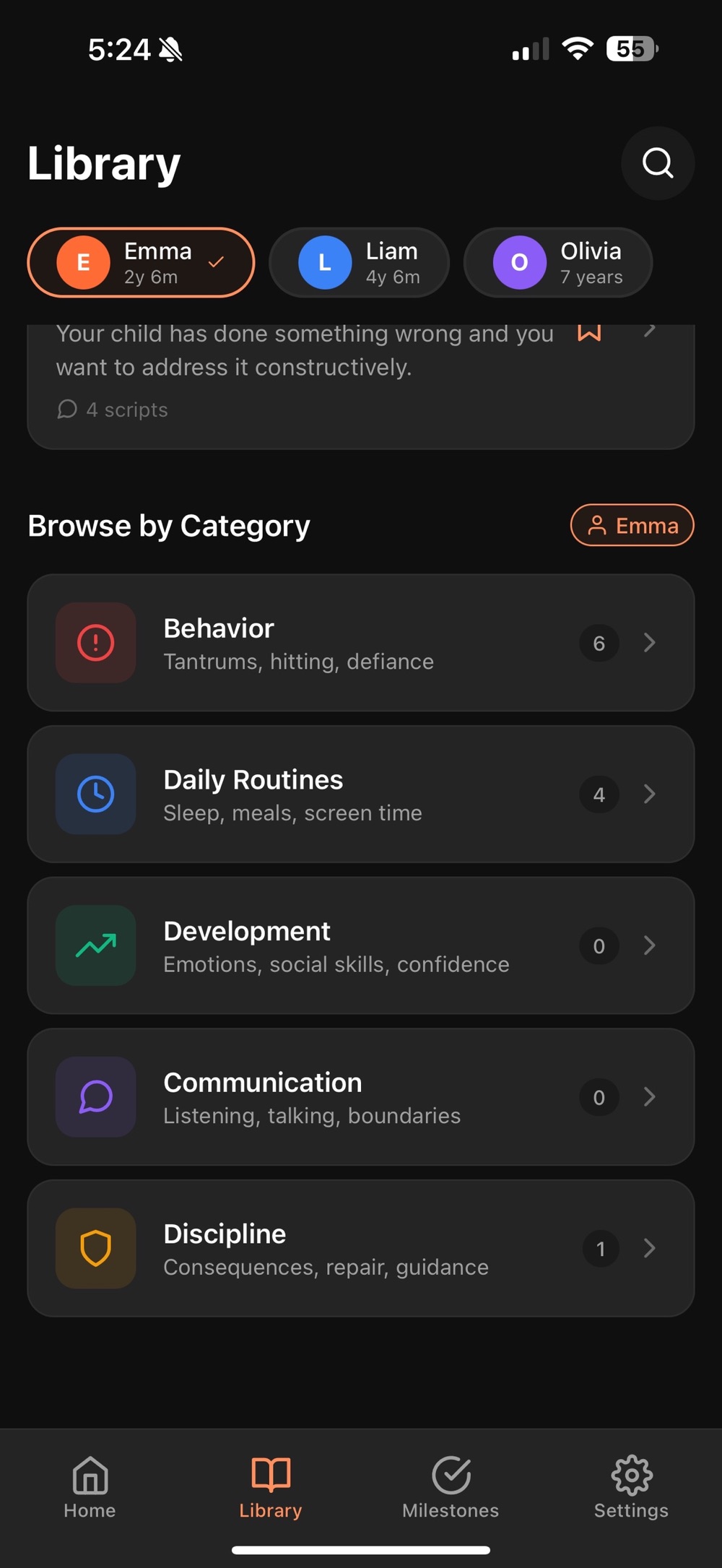
ParentPhrase turns positive discipline principles into ready-to-use scripts: the exact phrases that work, what to avoid saying, and a brief explanation of why each approach works — organized by situation and filterable by your child's age.
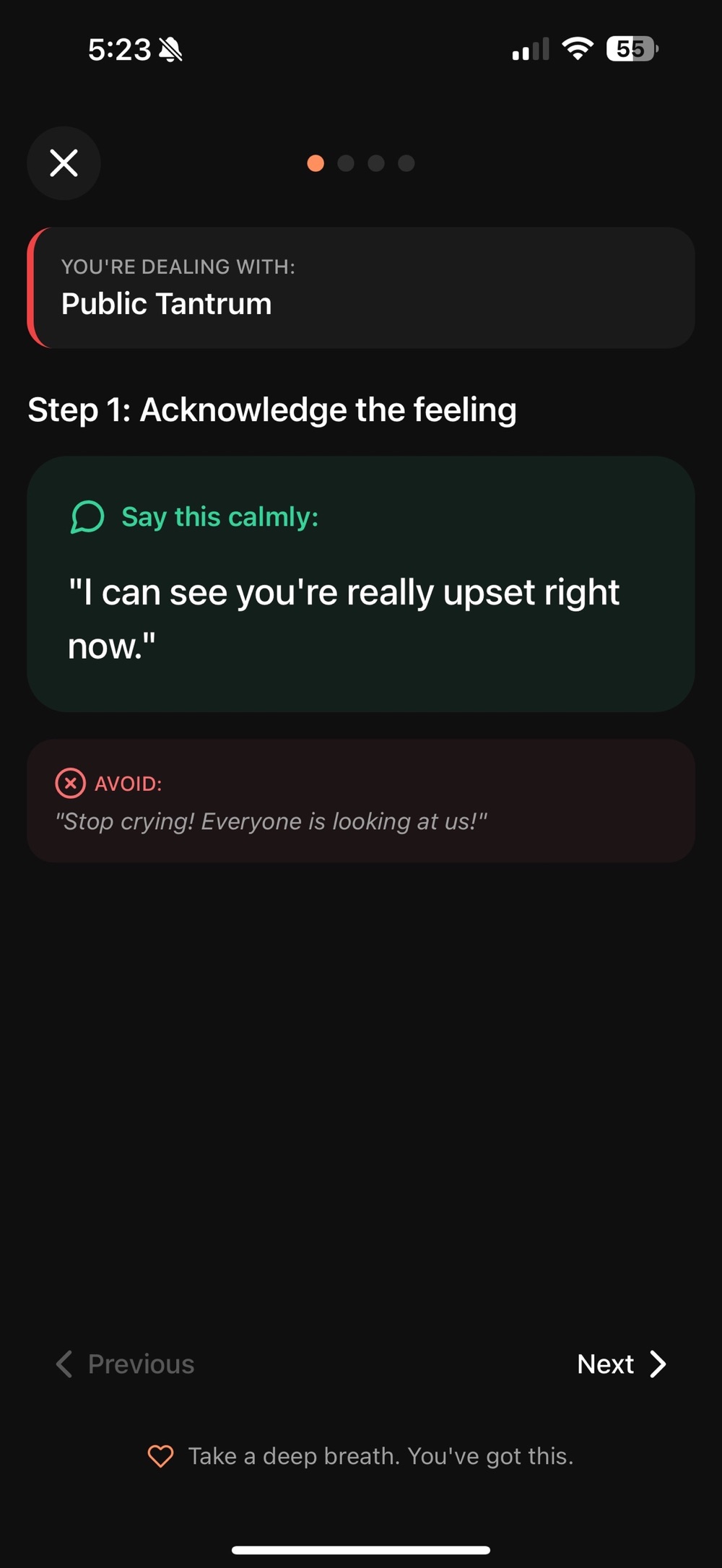
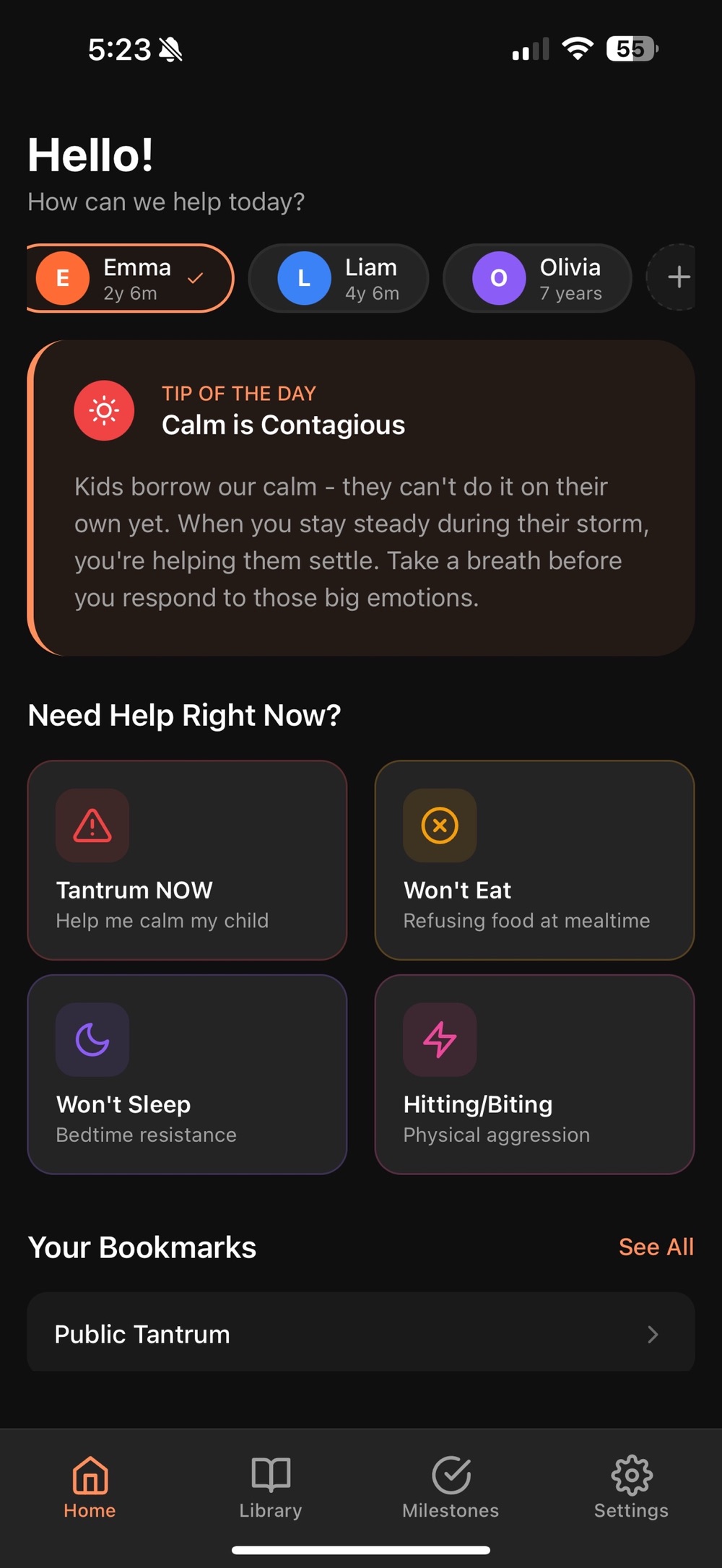
When a meltdown hits, one tap on Right Now emergency help brings up calm, step-by-step scripts in a full-screen mode that minimizes distractions. No internet needed.
Built for real moments, not lectures
Everything below comes straight from the app — no fluff, no filler.
Right Now emergency help
Tap one button when your child is having a meltdown. Get calm, step-by-step scripts to guide you through the moment, in a full-screen mode that minimizes distractions.
Scripts & phrases library
Expert-backed phrases organized by situation. Each script shows what to SAY and what to AVOID, with a brief explanation of why the approach works.
Covers ages 0–12
Infant sleep and feeding, toddler tantrums and potty training, preschool emotions and sibling conflicts, elementary homework battles and screen time. Filter by age for relevant guidance.
Milestone tracking
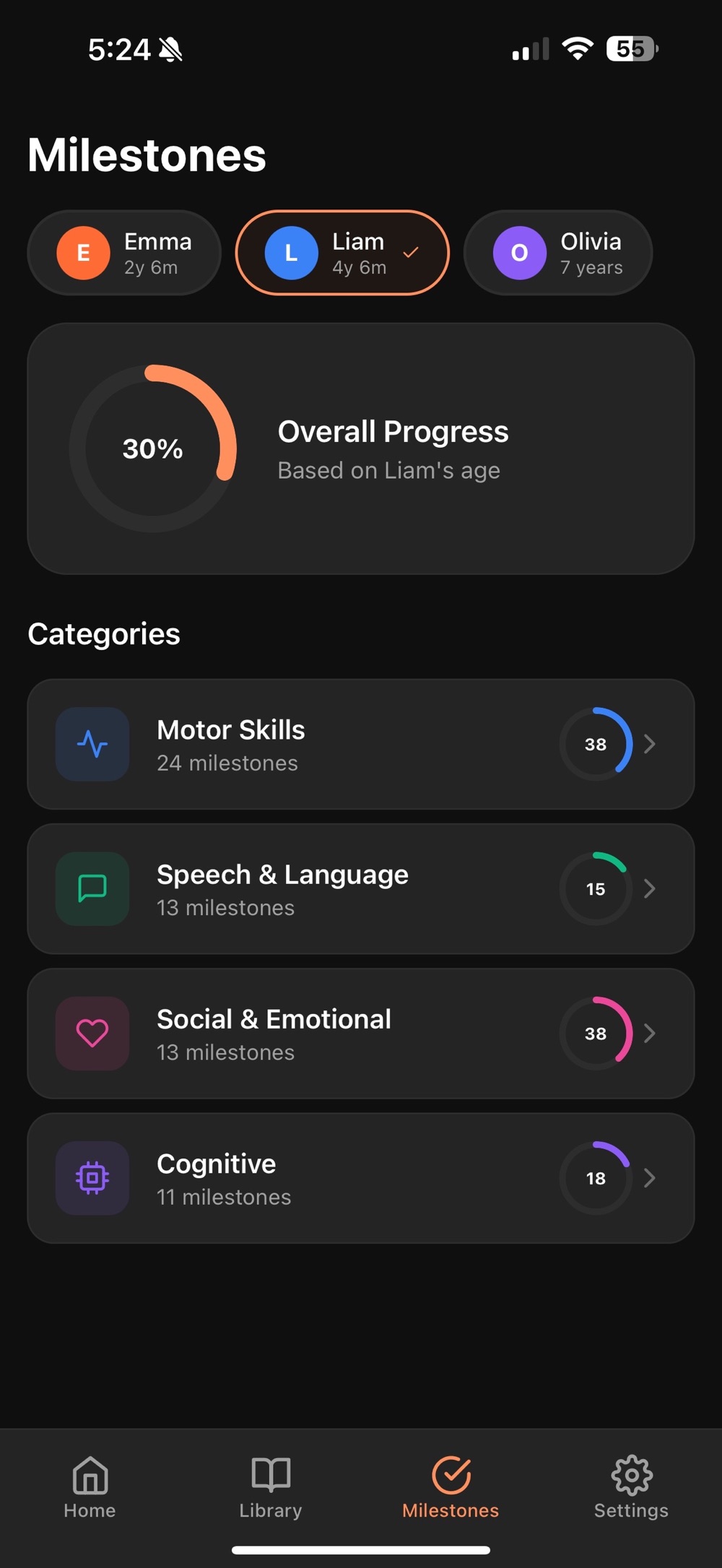
Track motor, speech, social, and cognitive milestones with visual progress indicators for each child. Check off achievements with optional dates.
Personal journal
Keep notes on what works for each child and track progress over time. Journal entries can be included in your PDF export.
100% private, fully offline
No accounts. No cloud sync. No analytics. No tracking. Everything stays on your phone, and you can export your data anytime as a PDF you control.
A look inside ParentPhrase
Four screens from the App Store listing: the home you open mid-meltdown, a script step, the library behind it, and the milestones you track per child.
Scripts for the situations that actually happen
Behavior
- Tantrums and meltdowns
- Hitting, biting, and kicking
- Defiance and back-talk
- Lying and truth-telling
- Sibling conflicts
Daily routines
- Sleep and bedtime resistance
- Picky eating and food refusal
- Morning routine struggles
- Screen time limits
Development
- Emotional regulation skills
- Building confidence
- Encouraging independence
- Social skills development
Communication
- Validating feelings
- Setting clear boundaries
- Active listening techniques
- Problem-solving together
Free to try. One fair price to keep forever.
Start free with essential guidance on tantrums, sleep, and eating. Upgrade when you're ready — weekly at $2.99, or pay once for lifetime access.
Free
$0
- 1 child profile
- 3 guidance topics: Tantrums, Sleep, Eating
- Sample scripts for each situation
- Daily tip cards
- Basic milestone checklist
Premium
$29.99 lifetime
or $2.99 / week
- Unlimited child profiles
- All 7+ guidance categories, 100+ scripts
- Full milestone tracking with dates and progress
- Personal journal for each child
- PDF export of progress reports
- Unlimited bookmarks
- All "Right Now" emergency scripts
Three moments ParentPhrase was made for
The supermarket meltdown
Tap Right Now emergency help and follow calm, step-by-step scripts — full screen, no distractions, no internet required. It works anywhere a meltdown happens.
The nightly bedtime standoff
Open the sleep and bedtime resistance scripts, filtered to your child's age. See what to say, what to avoid, and why the approach works — before you walk into the bedroom.
The dinner-table refusal
Picky eating scripts help you respond without pressure or bribes. Note what worked in your child's journal, and watch progress build over time.
Learn the words before you need them
Evergreen, expert-informed guides on the moments every parent faces — written by the team behind ParentPhrase.
What to Say During a Toddler Tantrum
Why meltdowns happen, phrases that de-escalate, what to avoid, and how to handle public tantrums.
Read the guide →What to Say Instead of Yelling
Kind-and-firm positive discipline phrases for boundaries, defiance, and the moments you're about to lose it.
Read the guide →What to Say to a Picky Eater
Pressure-free mealtime language that lowers the stakes and keeps food battles off the table.
Read the guide →Bedtime Resistance: What to Say
Calm phrases and routine language for the child who fights sleep every single night.
Read the guide →Milestones 0–12: What to Track
Motor, speech, social, and cognitive milestones by age — and how to track them without handing over your child's data.
Read the guide →Questions parents ask before downloading
Is ParentPhrase free?
Yes — ParentPhrase is free to download and free to start on both the App Store and Google Play. The free version includes 1 child profile, 3 guidance topics (Tantrums, Sleep, Eating), sample scripts for each situation, daily tip cards, and a basic milestone checklist. Premium unlocks everything for $2.99 per week or a one-time $29.99 lifetime purchase.
Does ParentPhrase collect my family's data?
No. ParentPhrase has no accounts, no cloud sync, no analytics, and no tracking. Everything stays on your phone, and you can export your data anytime as a PDF that you control.
What ages does ParentPhrase cover?
Ages 0 to 12: infants (0–12 months, sleep and feeding), toddlers (1–3, tantrums, hitting, biting, potty training), preschoolers (3–6, emotional regulation, bedtime resistance, sibling conflicts), and elementary kids (6–12, homework battles, screen time, back-talk). You can filter scripts by your child's age.
Does it work without internet?
Yes — ParentPhrase works completely offline. No internet is required, so you can open the app and get help instantly at home, in a store, or anywhere a meltdown might happen.
What topics are covered?
Behavior (tantrums, hitting and biting, defiance and back-talk, lying, sibling conflicts), daily routines (sleep and bedtime resistance, picky eating, morning struggles, screen time limits), development (emotional regulation, confidence, independence, social skills), and communication (validating feelings, setting boundaries, active listening, problem-solving together). Premium includes all 7+ guidance categories with 100+ scripts.
Is the guidance based on research?
The content is synthesized from established positive discipline and child development research. Every script is designed to connect with your child while maintaining firm, loving boundaries, and each one explains why the approach works.
Is ParentPhrase available on Android?
Yes. ParentPhrase is free to download on Google Play for Android, as well as on the App Store for iPhone and iPad (iOS 15.1 or later).
Have the right words ready — before the next meltdown
Download ParentPhrase free and start with tantrums, sleep, and eating today.