
Works 100% offline · No ads · Zero data collection
The engineering formulas app that works anywhere — no signal required
EngiRef packs 140+ formulas with step-by-step solutions, 55+ material property sheets, bolt/pipe/wire reference tables, and a 16-category unit converter into one offline app for iPhone, iPad, and Android.
Free on the App Store · iOS 15.1+ · iPad-optimized layouts
- 140+
- engineering formulas
- 55+
- material property sheets
- 16
- unit converter categories
- 34
- physical constants
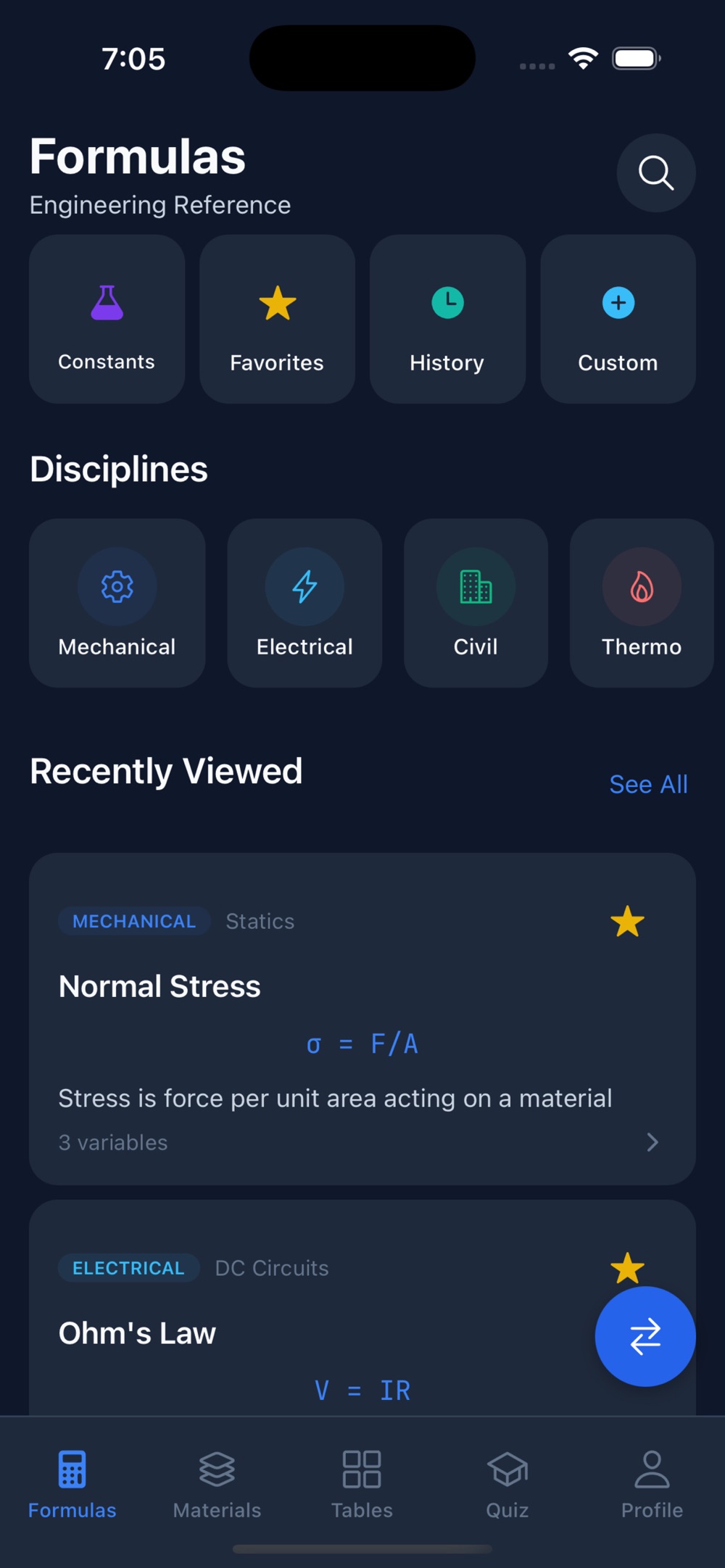
On screen
What the app looks like in the field
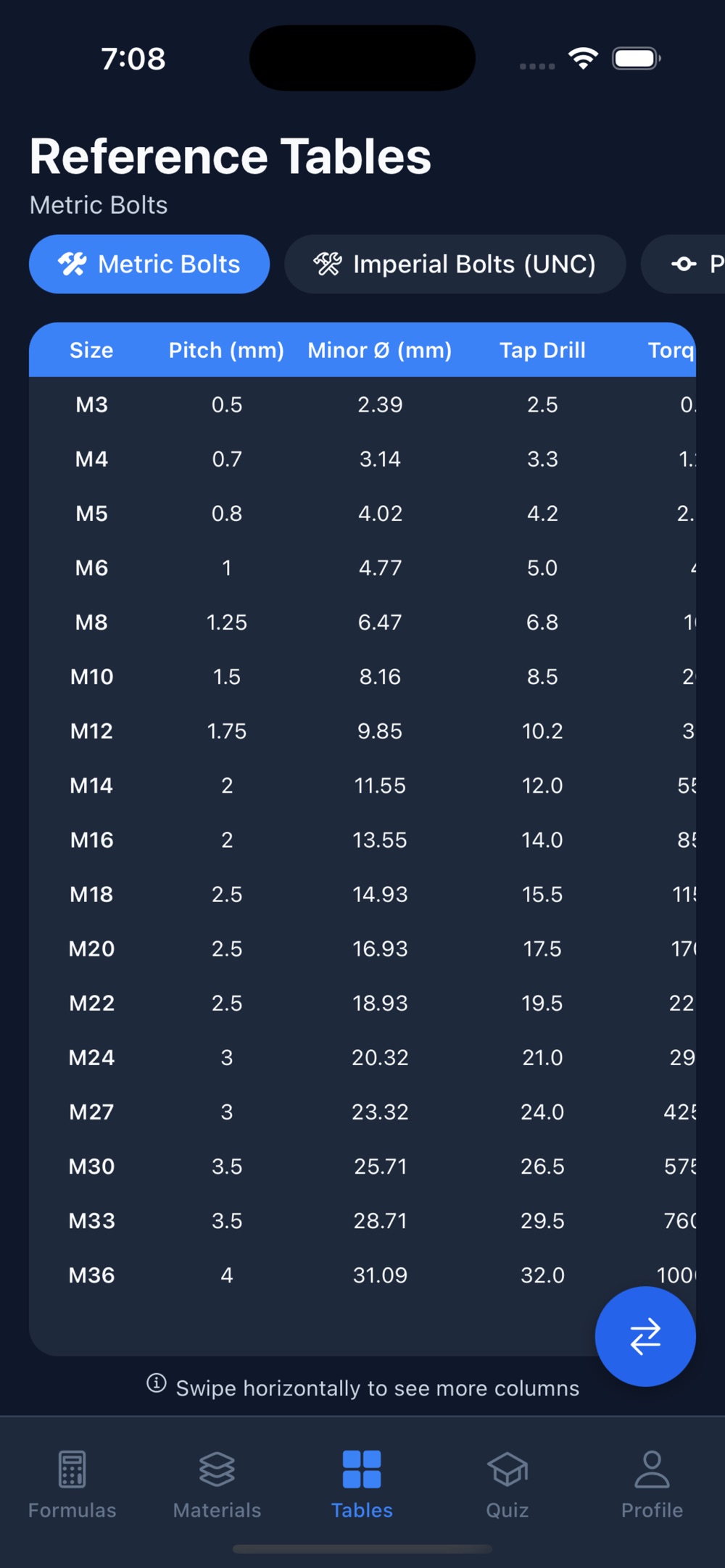
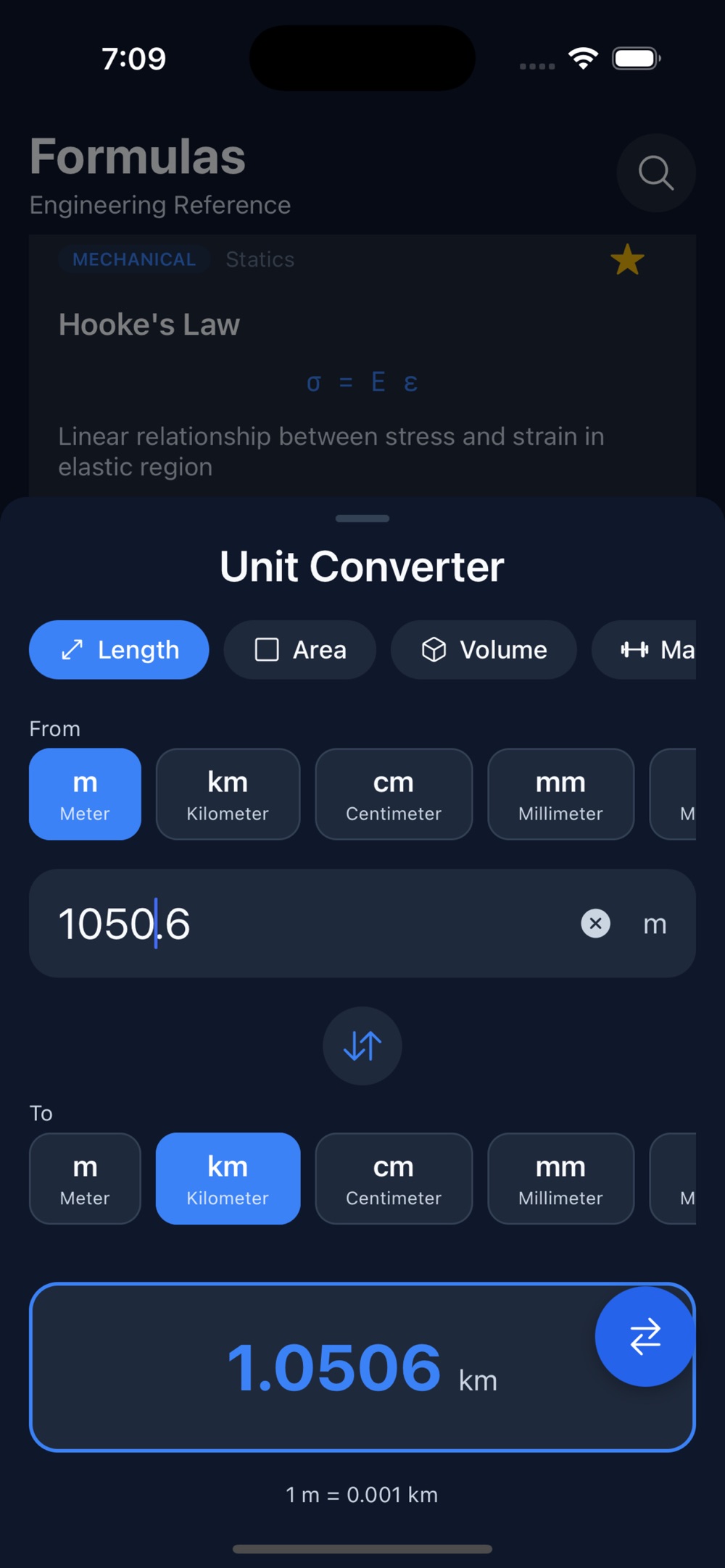
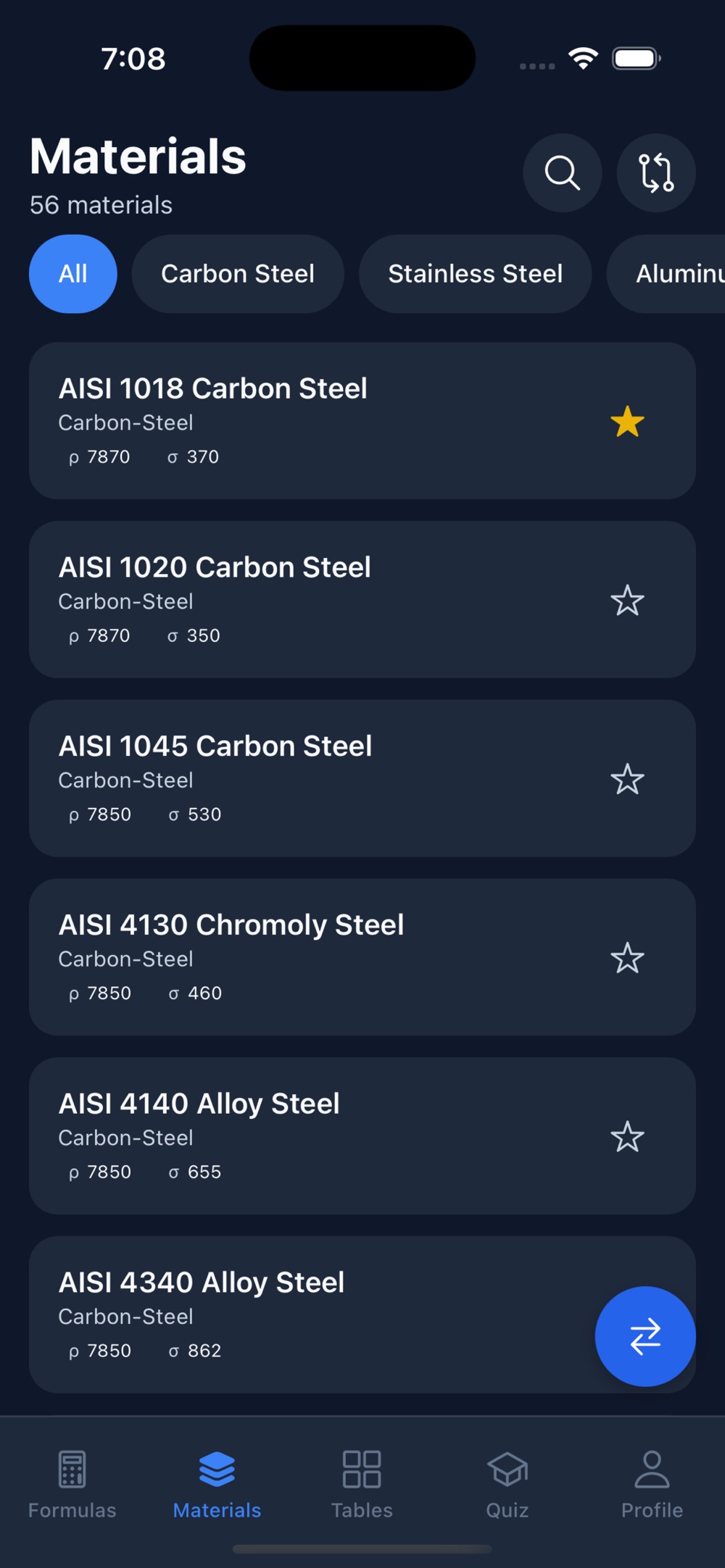
Three more screens, all working with the phone in airplane mode: the reference tables, the slide-over unit converter, and the materials database.
Why EngiRef exists
Reference data shouldn't depend on a signal
Formula lookups happen at inconvenient moments: on a shop floor with no Wi-Fi, in an exam-prep session, or on a site visit where your only tool is your phone.
The usual routine
- Googling a formula and wading through ad-heavy pages that may not load in the field.
- Carrying handbooks or PDF dumps that are slow to search on a phone.
- Separate apps for conversions, material data, and calculations.
- Calculators that spit out a number without showing how it was derived.
The EngiRef approach
- Formulas, materials, tables, constants, and a unit converter in one app — all stored on device, 100% offline.
- A built-in calculator that shows step-by-step solutions, so the process is as visible as the answer.
- A slide-over unit converter reachable from any screen.
- Zero data collection, no analytics, no ads.
What's inside
One app, six reference tools
Everything below ships with the app and works without an internet connection.
Formula library — 140+ formulas
Organized by discipline: mechanical (stress, strain, torque, power, gear ratios, spring design), electrical (Ohm's law, AC/DC circuits, impedance, resonance), civil/structural (beam deflection, Euler buckling, Manning's equation), thermodynamics, fluid mechanics, and materials science. Rendered in LaTeX for clean notation.
Built-in calculator with steps
Enter your values and get instant results — with a step-by-step solution for every calculation, so you learn the process rather than copying an answer. Calculation history is kept with timestamps.
Materials database — 55+ materials
Carbon and stainless steels, aluminum alloys, titanium, copper and nickel alloys, engineering plastics, composites, concrete, and wood. Compare up to 3 materials side-by-side on density, tensile strength, elastic modulus, thermal conductivity, and more.
Reference tables
Bolt specifications from metric M3–M36 plus SAE/imperial sizes, NPS pipe schedules with dimensions and wall thickness, and AWG wire gauges 0000–40 with ampacity ratings.
Unit converter — 16 categories
Length, pressure, temperature, force, energy, flow rate, viscosity, and more. It lives in a slide-over panel, so you can convert units from any screen without losing your place.
Quiz mode & constants
Flashcard-style quizzes with progress tracking across all disciplines — built for FE and PE exam prep. Plus quick reference for 34 physical constants, from the speed of light to Avogadro's number.
Material data, side by side
From AISI 1018 to PEEK — specs without the search
The materials database covers the alloys and polymers engineers actually specify, with the properties that drive selection decisions.
Metals
- Carbon steels: AISI 1018, 1045, 4140, 4340
- Stainless steels: 304, 316, 17-4 PH
- Aluminum alloys: 6061-T6, 7075-T6, 2024-T3
- Titanium, copper, and nickel alloys
Non-metals & comparison
- Plastics: ABS, HDPE, Nylon, PEEK, Delrin
- Composites, concrete, and wood
- Compare up to 3 materials side-by-side
- Density, tensile strength, elastic modulus, thermal conductivity, and more
Who it's for
Built for the way engineers actually look things up
Students & exam candidates
Step-by-step solutions turn every lookup into a worked example, and quiz mode drills formulas flashcard-style with progress tracking — aimed squarely at FE and PE exam preparation.
Working engineers
Quick field reference for formulas, constants, and conversions when you're away from your desk — with favorites for the formulas you reach for weekly and custom formulas you can create, save, export, and share.
Technicians & makers
Bolt specs, pipe schedules, wire gauges with ampacity, and material property sheets — the shop-floor data that normally lives in dog-eared handbooks, searchable in your pocket.
Questions, answered
Frequently asked questions
Does EngiRef really work offline?
Yes. EngiRef works 100% offline. Formulas, material properties, reference tables, physical constants, and the unit converter are all available with no internet connection — useful in the field, in labs, or in exam-prep sessions without Wi-Fi.
Is EngiRef free?
EngiRef is listed as free on the App Store, and it is also available on Google Play. There are no ads in the app.
Which engineering disciplines does EngiRef cover?
The formula library covers 140+ formulas across mechanical engineering (stress, strain, torque, power, gear ratios, spring design), electrical engineering (Ohm's law, AC/DC circuits, impedance, resonance), civil/structural (beam deflection, Euler buckling, Manning's equation), thermodynamics, fluid mechanics, and materials science.
Does the calculator just give an answer, or does it show the work?
Every calculation shows a step-by-step solution, so you understand the process, not just the result. That makes it useful for learning and exam preparation, not only for quick answers.
Can EngiRef help me prepare for the FE or PE exam?
EngiRef includes a flashcard-style quiz mode with progress tracking across all disciplines, designed to help you prepare for FE and PE exams, alongside the formula library and step-by-step calculator.
What material data does EngiRef include?
A database of 55+ engineering materials — carbon steels (AISI 1018, 1045, 4140, 4340), stainless steels (304, 316, 17-4 PH), aluminum alloys (6061-T6, 7075-T6, 2024-T3), titanium, copper and nickel alloys, plastics (ABS, HDPE, Nylon, PEEK, Delrin), composites, concrete, and wood. You can compare up to 3 materials side-by-side with density, tensile strength, elastic modulus, thermal conductivity, and more.
Does EngiRef track me or collect my data?
No. EngiRef collects zero personal data — no analytics and no ads. Calculations, history, and favorites stay on your device.
Learn the fundamentals
Engineering reference guides
Evergreen explainers written for students, exam candidates, and working engineers — no app required to get value from them.
How to Master Formulas for the FE Exam
A study strategy built around the NCEES reference handbook: why recognition beats memorization, and how to drill formulas so they surface under time pressure.
Read the guide →Beam Deflection Explained
What the classic deflection formulas actually mean, how boundary conditions change everything, and how to sanity-check results before you trust them.
Read the guide →How to Compare Engineering Materials
Steel vs. aluminum vs. titanium vs. engineering plastics: the five properties that drive most selection decisions, and the ratios that matter more than raw numbers.
Read the guide →Unit Conversion Errors in Engineering
From the Mars Climate Orbiter to everyday spreadsheet slips — why unit mistakes happen, the categories that cause the most trouble, and habits that prevent them.
Read the guide →Put an engineering reference in your pocket
Free download. Works 100% offline. No ads, no analytics, no account — your calculations stay on your device.